

Instruction
Step-by-step instructions for the Floun Webflow template, covering setup, GSAP interactions, and how to customize animations and page elements with ease.
GSAP Guide
Portfolio Hover Effect
This script adds a hover effect to a portfolio grid using GSAP. When you hover over any item (
.portfolio-single), it dims all the other items to 50% opacity while keeping the hovered one fully visible, creating a spotlight effect. Once your cursor leaves the whole grid, every item fades back to full opacity. The smooth 0.4s transitions and overwrite: true keep the animations clean even when moving quickly between items.<script>
document.addEventListener('DOMContentLoaded', function () {
const group = document.querySelector('.portfolio-content');
if (!group || typeof gsap === 'undefined') return;
const items = gsap.utils.toArray('.portfolio-single', group);
items.forEach((item) => {
item.addEventListener('mouseenter', () => {
items.forEach((other) => {
gsap.to(other, {
opacity: other === item ? 1 : 0.5,
duration: 0.4,
ease: 'power2.out',
overwrite: true
});
});
});
});
group.addEventListener('mouseleave', () => {
gsap.to(items, {
opacity: 1,
duration: 0.4,
ease: 'power2.out',
overwrite: true
});
});
});
</script>Hamburger Icon Click
This script animates a hamburger icon with GSAP. Clicking it toggles between a hamburger and an "X" — the middle line vanishes while the top and bottom rotate into a cross. While closed, hovering staggers the three lines to different widths for a subtle effect. The icon reverses back to a hamburger when clicked again or when any menu link is selected.
<script>
document.addEventListener('DOMContentLoaded', function () {
  const wrap = document.querySelector('.hamburger-wrap');
  if (!wrap || typeof gsap === 'undefined') return;
  const lines = gsap.utils.toArray('.hamburger-line', wrap);
  if (lines.length < 3) return;
  const [top, middle, bottom] = lines;
  const shift = '0.5rem';
  gsap.set(lines, { width: '100%', transformOrigin: 'center center' });

  const tl = gsap.timeline({
    paused: true,
    defaults: { duration: 0.4, ease: 'power3.inOut' }
  });
  tl
    .to(middle, { scaleX: 0 }, 0)
    .to(top,    { y: shift, rotate: 135 }, 0)
    .to(bottom, { y: '-' + shift, rotate: 45 }, 0);
  let isOpen = false;
  function open() {
    isOpen = true;
    gsap.to(lines, { width: '100%', duration: 0.3, ease: 'power2.out' });
    tl.play();
  }
  function close() {
    isOpen = false;
    gsap.to(lines, { width: '100%', duration: 0.3, ease: 'power2.out' });
    tl.reverse();
  }

  wrap.addEventListener('click', () => { isOpen ? close() : open(); });

  wrap.addEventListener('mouseenter', () => {
    if (isOpen) return;
    gsap.to(top,    { width: '85%',  duration: 0.3, ease: 'power2.out' });
    gsap.to(middle, { width: '65%',  duration: 0.3, ease: 'power2.out' });
    gsap.to(bottom, { width: '100%', duration: 0.3, ease: 'power2.out' });
  });
  wrap.addEventListener('mouseleave', () => {
    if (isOpen) return;
    gsap.to(lines, { width: '100%', duration: 0.3, ease: 'power2.out' });
  });

  gsap.utils.toArray('.menu-link').forEach((link) => {
    link.addEventListener('click', () => { if (isOpen) close(); });
  });
});
</script>
Interaction
Sidebar Menu Open
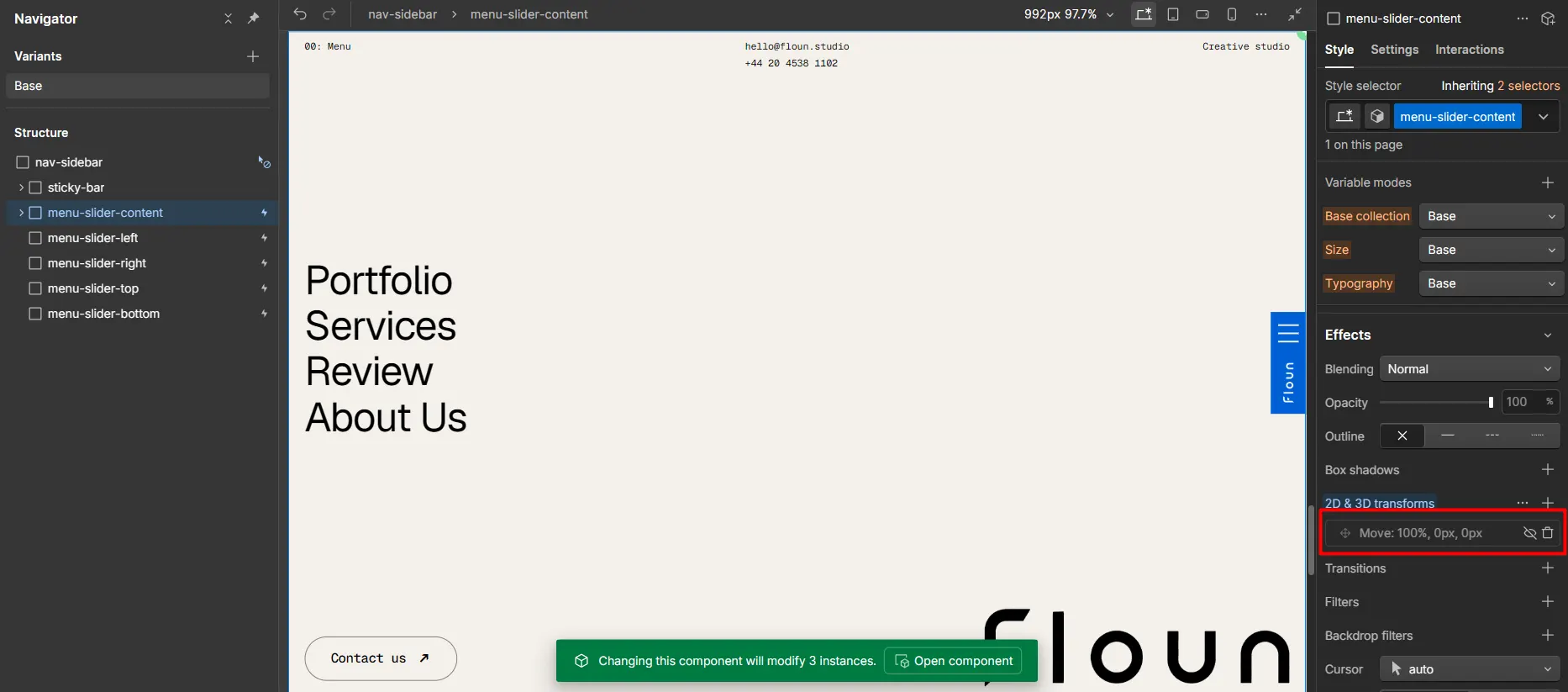
To open the menu, select menu-slider-content and click the eye icon on the 2D & 3D Transform (Move) effect. To close it, simply click the eye icon again.
.png)